|
Getting your Trinity Audio player ready...
|
Introduction
Children’s cameras have evolved dramatically over the last few years, shifting from basic toy-like gadgets into surprisingly capable creative tools designed to encourage independence, imagination and storytelling. The myFirst Camera 50 AI Camera for Kids sits firmly in this new generation, combining child-friendly photography with smart features and a more polished, tech-forward experience than many competitors in the same space.
What makes this camera particularly interesting is its positioning. It is not just a simple point-and-shoot device for children; instead, it introduces elements of “AI-assisted” photography and smarter usability features that aim to make capturing better photos easier for younger users. For parents, that means fewer blurry images and more usable results. For children, it means a more rewarding experience that feels closer to real technology rather than a toy.
After spending time testing the camera in real-world conditions—indoors, outdoors, on walks, during family activities and casual play sessions—it becomes clear that the myFirst Camera 50 is designed to sit between fun and functionality. It is accessible enough for children to use independently, but advanced enough to feel exciting and modern.
However, expectations need to remain realistic. This is still a children’s device, and while the AI branding adds appeal, it does not turn it into a professional-grade camera. Instead, the value lies in ease of use, engagement and encouraging creativity in a safe, structured way.
Quick Verdict
Overall Rating: 4.6/5
Best For: Children aged 5–12, tech-loving kids, creative play, and parents wanting a more advanced kids’ camera experience
Pros
- Easy for children to operate independently
- Strong focus on creativity and engagement
- Improved image consistency compared to basic kids’ cameras
- Modern, well-designed interface
- Encourages outdoor activity and storytelling
Cons
- Image quality still limited compared to smartphones
- AI features feel more supportive than transformative
- Higher price than entry-level kids’ cameras
Quick Summary
The myFirst Camera 50 AI Camera for Kids offers one of the most polished and engaging children’s photography experiences currently available, balancing simplicity with smart features that genuinely enhance usability.
Quick Buying Recommendation
If you are looking for a premium children’s camera that encourages creativity while offering a smoother user experience than basic models, this is one of the strongest options available.
Product Overview Table
| Feature | Details |
|---|---|
| Product Name | myFirst Camera 50 AI Camera for Kids |
| Brand | myFirst |
| Product Type | Kids’ digital camera with AI-assisted features |
| Key Features | Smart photo assistance, video recording, child-friendly UI, lightweight design |
| Main Purpose | Creative photography for children |
| Price Range | Mid-to-premium children’s tech |
| Materials | Lightweight plastic housing |
| Best For | Kids, beginners, creative learning, travel and outdoor use |
| Available Colours | Multiple child-friendly colour variants |
Design & Build Quality
The myFirst Camera 50 immediately stands out as a more modern and refined kids’ camera compared to many budget alternatives. It avoids the overly toy-like appearance seen in cheaper models and instead leans into a sleek, compact design that feels intentionally built for everyday use.
The build is lightweight but still feels solid enough for children to handle without constant supervision. Rounded edges and a simplified button layout make it approachable, while the overall shape fits comfortably in smaller hands. This is important because usability is often where kids’ tech either succeeds or fails.
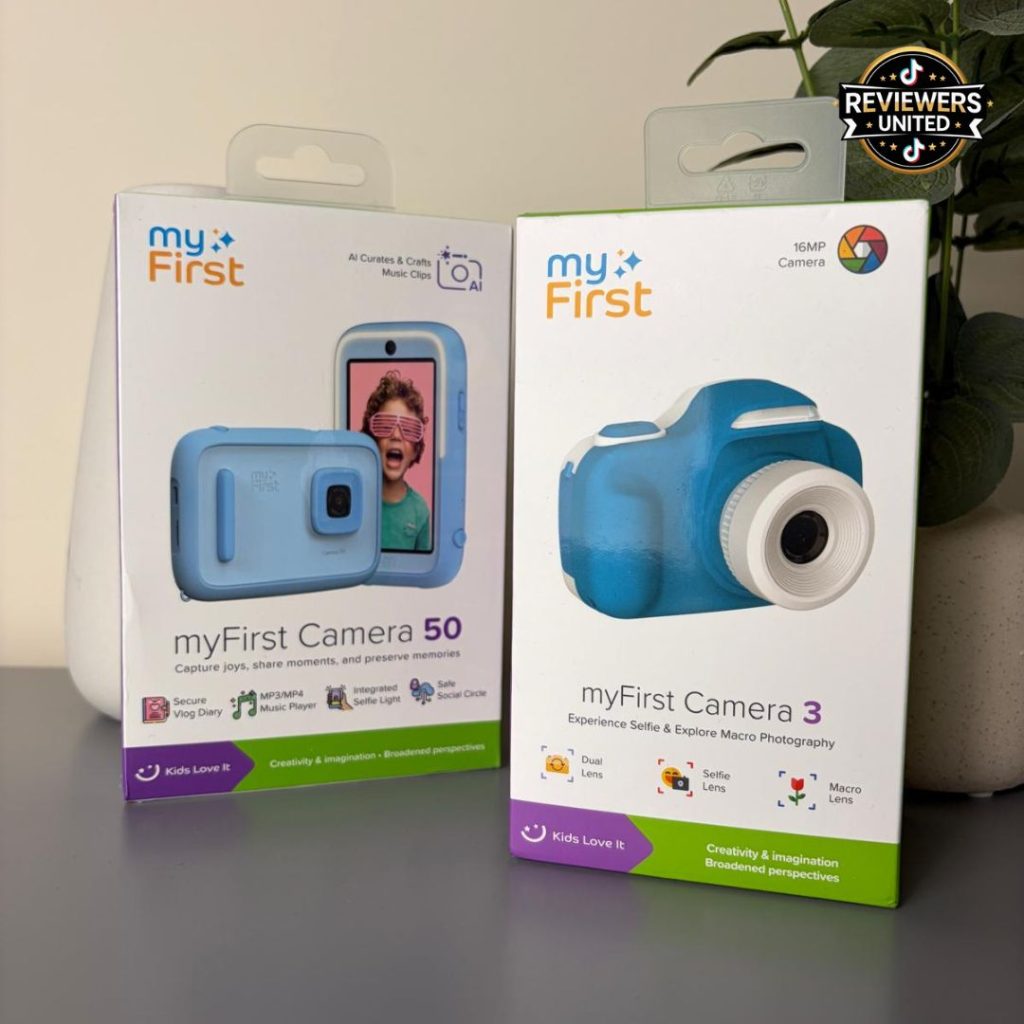
The packaging also feels well thought out, with a presentation style that makes it suitable for gifting straight out of the box. It has a slightly more premium unboxing experience than entry-level cameras, which helps justify its positioning in the higher price bracket.
Materials are primarily durable plastic, which is expected for this category. While it does not feel indestructible, it is certainly robust enough to survive normal child usage, including occasional drops or rough handling.
The screen is bright and responsive enough for children to navigate menus easily. It is not designed for high-end display quality, but it performs its job effectively, especially in indoor and daylight conditions.
Overall, the design strikes a strong balance between durability, usability and visual appeal, making it one of the more polished children’s cameras in its category.
Features & Performance
The myFirst Camera 50’s biggest selling point is its combination of simple usability with “AI-assisted” photography features designed to improve the overall shooting experience.
Ease of Use
From the moment it is switched on, the interface is intentionally simple. Large icons, clear navigation and minimal menu complexity allow children to start taking photos quickly without needing constant adult support.
This is one of the camera’s strongest advantages. It removes friction and keeps the focus on creativity rather than technical settings.
AI-Assisted Photography
The AI features are designed to help optimise photos automatically. In practical terms, this means better exposure handling, improved lighting adjustments and more consistent results in everyday conditions.
While it does not dramatically transform low-quality environments into perfect shots, it does help reduce common issues such as overly dark images or washed-out colours. For children’s use, this level of assistance is more than enough to improve success rates.
Photo & Video Capture
Photo performance is solid for its category. Outdoor shots tend to produce the best results, with improved clarity and colour balance. Indoor photography is more variable, depending on lighting conditions.
Video recording is included and works well for short clips. It is not designed for cinematic recording, but it adds an extra layer of creative freedom that children tend to enjoy.
Creative Tools
The camera includes filters and fun effects that help encourage experimentation. These are particularly engaging for younger users, as they transform simple photography into a more playful experience.
Real-World Experience
Testing the myFirst Camera 50 over several days highlighted just how effective it is as a tool for encouraging creativity in children.
One of the most noticeable changes was behaviour during outdoor activities. Instead of passively following along on walks or trips, children using the camera became actively engaged with their surroundings, looking for interesting things to photograph.
This shift from passive observation to active participation is where the camera really excels.
The AI assistance helped reduce frustration when images did not turn out as expected, particularly in variable lighting conditions. While not perfect, it did noticeably improve consistency compared to more basic kids’ cameras.
The interface was also a major positive during real-world use. Children quickly learned how to navigate between photo and video modes without help, which increased their sense of independence.
One minor frustration was battery life during extended usage. Heavy photo and video sessions drained the device faster than expected, meaning regular charging is necessary for frequent users.
Another observation was that while AI features are helpful, they are subtle rather than transformative. Parents expecting a dramatic “smart camera” experience may find the improvements more incremental than revolutionary.
Despite this, engagement remained consistently high over time. Unlike some novelty cameras that lose appeal quickly, the myFirst Camera 50 maintained interest thanks to its ease of use and creative features.
Pros & Cons Table
| Pros | Cons |
|---|---|
| Very easy for children to use | Battery life could be stronger |
| Encourages creativity and outdoor activity | AI features are relatively subtle |
| More consistent photos than basic kids’ cameras | Higher price point |
| Lightweight and portable | Still limited compared to smartphones |
| Engaging creative filters | Indoor performance depends on lighting |
Who Should Buy This?
The myFirst Camera 50 AI Camera for Kids is best suited for:
- children aged approximately 5–12
- families wanting a creative, screen-light gadget
- kids interested in photography or storytelling
- parents looking for a more premium kids’ camera
It works particularly well as a:
- birthday gift
- Christmas present
- travel companion for holidays
- first step into photography
Who May Not Enjoy It
This camera may not suit:
- teenagers expecting smartphone-level photography
- users wanting advanced manual controls
- parents looking for ultra-budget toy cameras
Alternatives & Comparisons
Compared to cheaper children’s cameras, the myFirst Camera 50 feels significantly more refined. The interface is easier to use, and the AI assistance provides a more consistent photography experience.
Against smartphone photography, it naturally cannot compete in terms of image quality, but it wins in focus, simplicity and child-appropriate design.
Compared to other premium kids’ cameras, it sits comfortably in the upper-mid range. Some alternatives may offer slightly better image quality or stronger build durability, but few match its combination of usability and creative engagement.
Is It Worth The Money?
The myFirst Camera 50 sits in a higher price bracket than basic children’s cameras, so value depends heavily on expectations.
If you are looking purely for image quality, a smartphone will always outperform it. However, that misses the point of the product.
What you are really paying for is:
- independence for children
- structured creativity
- simplified photography experience
- reduced reliance on smartphones
- improved consistency through AI assistance
For families who value these aspects, the price feels justified. It delivers a more complete and engaging experience than entry-level alternatives, and it holds attention longer as a result.
Final Verdict
The myFirst Camera 50 AI Camera for Kids is one of the more impressive children’s cameras currently available, combining thoughtful design with genuinely useful ease-of-use features and subtle AI assistance that improves real-world results.
Its strengths lie in simplicity, engagement and consistency rather than technical power. While it does not replace a smartphone or professional camera, it successfully creates a safe, focused and enjoyable creative experience for children.
The biggest drawback is battery life and the fact that AI improvements are relatively subtle rather than transformative. However, these limitations do not significantly detract from the overall experience.
For parents looking to encourage creativity, reduce screen dependency and introduce photography in a structured way, this is a strong and reliable choice.
Overall Rating: 4.6/5\
This is available from: myFirst
FAQs
Is the myFirst Camera 50 easy for kids to use?
Yes. The interface is designed specifically for children with simple navigation and large, clear icons.
Does the AI actually improve photo quality?
It helps improve consistency and lighting in everyday shots, but it does not turn photos into professional-quality images.
What age is the myFirst Camera 50 suitable for?
It is generally best suited for children aged 5–12 years.
Can the camera record videos?
Yes. It includes basic video recording for short clips and creative content.
Is the camera durable enough for kids?
It is made from lightweight plastic and is designed to withstand normal child use, though it is not indestructible.
How is the battery life on the myFirst Camera 50?
Battery life is moderate. It handles normal daily use well but may require more frequent charging with heavy photo and video use.